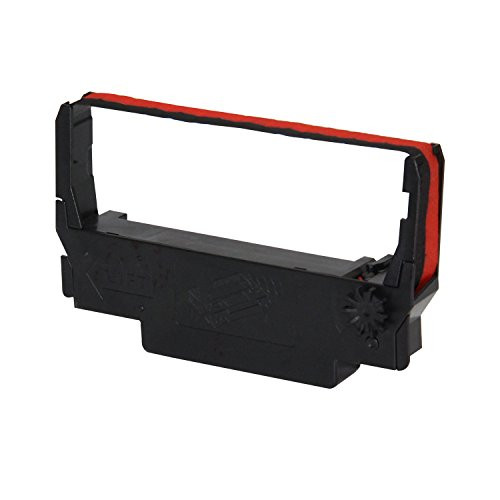
The Epson TM-U220IIB is an Ethernet impact (dot matrix) receipt printer. It prints on ordinary plain bond paper using an inked ERC-38 ribbon rather than heat, which is what makes it a general-purpose workhorse: the printed docket cannot fade, curl or blacken, it runs 1-ply or 2-ply for instant duplicate copies, and it sits on your network so any terminal can print to it by IP.
It prints black and red at up to 6.0 lines per second, has a selectable auto-cutter and drop-in paper loading, and takes 76mm, 69.5mm and 57.5mm rolls. It carries a cash drawer kick-out port and speaks ESC/POS, the most widely supported POS printer language, so it drops into most existing systems.
Where the Epson TM-U220IIB is used
Any counter that needs a durable plain-paper receipt, a duplicate copy, or both. The TM-U220 series is the long-standing default across a wide range of Australian businesses:
- Retail counters and service desks, where a plain-paper receipt stays legible in a wallet or a filing drawer for years, unlike a thermal receipt that fades.
- Hospitality kitchens, where heat and steam destroy thermal dockets.
- Dry cleaners and laundries, for 2-ply customer and garment tickets.
- Workshops, warehouses and dispatch, for 2-ply paperwork where one copy travels with the goods and one is filed.
- Pharmacies, clinics and back office, where records need to remain readable long term.
- Any site replacing an existing TM-U220, since ribbons, rolls and mounting are unchanged.
Why choose the Epson TM-U220IIB Ethernet printer?
- Plain bond, not thermal, so the print does not fade with heat, light, steam or age.
- 2-ply capable, so a single print gives you a kitchen copy and a second copy without reprinting.
- Ethernet built in, so the printer sits on your network and any till, tablet or cloud POS can send to it by IP.
- Two-colour black and red to flag allergens, urgent items and special instructions at a glance.
- Loud by design. The impact mechanism is audible over a working kitchen, which a silent thermal printer is not.
- Auto-cutter and drop-in loading for fast paper changes mid-service.
- ESC/POS command support, the most widely supported POS printer language in hospitality.
Impact vs thermal: which should you choose?
Thermal printers work by heating a chemical coating on the paper. They are cheaper to run and quieter, and for a dry, room-temperature front counter with short-lived receipts they are the sensible pick. The catch is that anything which heats the paper later also darkens it: warmth, sunlight, friction, steam, oils and simple age all degrade a thermal receipt, and it can never produce a carbon copy.
An impact printer has no heat-sensitive coating to ruin. It hammers an ERC-38 ribbon onto ordinary bond paper, so the text is physically inked into the page and survives heat, humidity, steam and grease for the whole service. That is why impact printing is chosen wherever a docket has to survive its environment or a second copy is needed: kitchens, dry cleaners, workshops, dispatch benches and any record that has to still be readable years later.
The same logic is why dry cleaners and laundries use it. A garment ticket sits next to steam presses and finishing equipment all day, and a thermal ticket in that environment greys off or smudges before the order is collected. An inked impact ticket does not, and because the printer runs 2-ply it produces the customer copy and the copy that stays with the garment in a single pass.
Key features of the Epson TM-U220IIB Ethernet printer
- 9-pin serial impact dot matrix mechanism
- Ethernet (10/100Base-T/TX) interface, network-addressable by IP
- Print speed up to 6.0 lps at 30 columns, 4.7 lps at 40 columns
- Two-colour printing with a black and red ERC-38 ribbon
- Selectable partial-cut auto-cutter
- Drop-in paper loading with clamshell cover
- 1-ply and 2-ply plain bond paper support
- Paper widths 76mm, 69.5mm and 57.5mm
- Cash drawer kick-out port
- ESC/POS command set
- Wall-mountable with an optional bracket
- Energy Star, CE and FCC certified
Specifications
| Brand | Epson |
| Model | TM-U220IIB (Ethernet) |
| Print method | 9-pin serial impact dot matrix |
| Print speed | Up to 6.0 lps (30 columns), 4.7 lps (40 columns) |
| Colours | Black and red (two-colour ribbon) |
| Interface | Ethernet 10/100Base-T/TX |
| Command set | ESC/POS |
| Paper type | Plain bond paper (not thermal), 1-ply or 2-ply |
| Paper widths | 76mm, 69.5mm, 57.5mm |
| Ribbon | Epson ERC-38 (black, or black/red for two-colour) |
| Auto-cutter | Yes, selectable partial cut |
| Cash drawer port | Yes, DK kick-out port |
| Power supply | PS-180 external, included |
| Dimensions | 160mm (W) x 286mm (D) x 157.5mm (H) |
| Weight | Approx. 2.5kg |
| Certifications | Energy Star, CE, FCC |
| Warranty | 24 Months Return to Base |
How it compares to other impact printers
All three are impact (dot matrix) printers, so any of them produces a durable plain-paper docket where a thermal printer would fade. The differences are connectivity and price positioning.
| Printer | Interfaces | Best for |
| Epson TM-U220IIB (this printer) | Ethernet | The hospitality default. Two-colour black/red, 2-ply capable, widest POS support |
| Element RW337D | Ethernet, Serial and USB | Budget-conscious fitouts, or when you need serial or USB as well as network |
| Star Micronics SP742 | Ethernet | Venues already standardised on Star hardware |
What's in the box
- Epson TM-U220IIB Ethernet impact printer
- PS-180 power supply
- ERC-38 ribbon cartridge (installed)
- Sample paper roll
- Setup documentation
Paper and ribbons for the TM-U220IIB
This is an impact printer, so it does not use thermal paper. It needs plain bond rolls and an ERC-38 ribbon, both of which we stock:
Using the TM-U220IIB as a kitchen printer
Kitchens are the single biggest use for this printer, and the reason is heat. A thermal docket left near a grill, fryer or pass-through heat lamp goes grey or fully black within minutes, and steam or oil smears it. An inked impact docket is unaffected and stays readable for the whole service.
Two further things matter on a pass. The impact mechanism is audible over a working kitchen, so staff hear an order land, which a silent thermal printer cannot do. And red printing flags allergens, modifiers and urgent items so they stand out at a glance. With Ethernet, one printer serves the kitchen while another sits behind the bar, both driven by IP from the same POS.
Using the TM-U220IIB in a dry cleaner or laundry
Dry cleaning and laundry counters need the same two things a kitchen does: a ticket that survives heat and steam, and more than one copy of it. The TM-U220IIB covers both. Running 2-ply bond, one print produces the customer receipt and the retained copy that tracks the order through cleaning, pressing and collection, with no reprint and no second device.
Two-colour printing is useful here as well: red is commonly used to flag rush or same-day orders, stain treatments and special handling instructions so they stand out on a busy rack. The printer is also supported by dry cleaning and laundry POS packages that expect an ESC/POS impact printer, and it can sit anywhere on the network over Ethernet, so the counter terminal and the back-of-house station can both print to it.
Note that garment tags themselves are usually printed on specialty 76mm wet-strength tag stock rather than standard bond. The TM-U220IIB handles 76mm rolls either way, so you can run bond for receipts and tag stock for garment tickets on the same printer.
Application use cases
- Retail counters and service desks. Plain-paper receipts that stay legible in a wallet or a filing drawer for years, unlike thermal receipts which fade.
- Restaurant and cafe kitchens. Order dockets at the pass, printed on bond so they survive the heat lamp for the length of service.
- Bars and clubs. A second network printer behind the bar so drink orders separate from food, driven by IP from the same POS.
- Takeaway and pizza shops. Two-colour printing to make delivery and pickup orders visually distinct at a glance.
- Dry cleaners and laundries. 2-ply tickets so the customer copy and the garment copy print together, and survive the steam press area.
- Workshops, warehouses and dispatch. 2-ply paperwork where one copy travels with the goods and one stays on file.
Frequently asked questions
Is the Epson TM-U220IIB a kitchen printer?
Yes. The TM-U220 series is the most widely used kitchen docket printer in Australian hospitality. Because it is an impact printer using an inked ribbon on plain bond paper rather than heat on thermal paper, the docket does not fade, curl or blacken near a grill, fryer or heat lamp. Its Ethernet port lets it sit on the venue network so any POS can print to it by IP.
Why use an impact printer instead of a thermal printer in a kitchen?
Thermal printing relies on a heat-sensitive coating, and kitchen heat destroys it: dockets go grey or fully black, and steam or oil smears them. An impact printer inks the paper physically, so the text survives heat, humidity and grease for the whole service. Impact printers are also audible, which matters when staff need to hear a new order arrive.
Can the Epson TM-U220IIB print 2-ply carbon copy dockets?
Yes. The TM-U220IIB takes 1-ply or 2-ply plain bond rolls, so a single print can produce a kitchen copy and a second copy for the pass, the customer or the file. Thermal printers cannot do this at all, which is one of the main reasons kitchens choose impact.
What paper and ribbon does the TM-U220IIB use?
Plain bond paper, not thermal, in 76mm, 69.5mm or 57.5mm widths, plus an Epson ERC-38 ribbon cartridge. Use a black ERC-38 for standard printing or a black and red ERC-38 for two-colour. We stock both, along with 76x76 single-ply and 2-ply bond rolls.
Will the TM-U220IIB work with my POS software?
It uses the ESC/POS command set and an Ethernet interface, which is the most widely supported combination in hospitality POS, and the TM-U220 series is listed as supported kitchen hardware by many providers. That said, compatibility depends on your specific POS: some cloud platforms only support a named list of printer models. Check the TM-U220IIB against your POS provider's supported-hardware list, or call us on 1300 115 808 before ordering and we will confirm it for you.
How do I set up the Epson TM-U220IIB on my network?
Install the Epson driver (Advanced Printer Driver, or OPOS if your POS needs it) before you connect the printer, then plug the Ethernet cable into your network switch or router. Assign the printer a static IP or a DHCP reservation so the address does not change and your POS keeps finding it after a reboot. Installing the driver first is the single most common fix for a printer that will not print.
Can it print in colour?
It prints two colours, black and red, when fitted with a black and red ERC-38 ribbon. Kitchens typically use red for allergens, urgent items, modifiers and special instructions so they stand out on a busy pass.
Does it cut the docket automatically?
Yes. It has a selectable auto-cutter set for a partial cut, which leaves a small tab so the docket stays attached until someone takes it, rather than dropping on the floor.
Can the TM-U220IIB be wall mounted?
Yes, with an optional wall-mount bracket, which is common in kitchens where bench space is tight and the printer needs to sit clear of splashes.
Can the TM-U220IIB be used in a dry cleaner or laundry?
Yes, it is a common choice for dry cleaning and laundry counters. It prints 2-ply, so the customer receipt and the copy that stays with the garment come out in one pass, and because it is an impact printer the ticket does not fade or smudge around steam presses and finishing equipment the way a thermal ticket does. Red printing is often used to flag rush and same-day orders. Garment tags are usually run on 76mm wet-strength tag stock; the printer takes 76mm rolls either way.
What is the difference between the TM-U220B and the TM-U220IIB?
Very little, and that is the point. The TM-U220II is the current production generation of the TM-U220 series and is functionally the same printer as the TM-U220B: same 9-pin impact mechanism, same ERC-38 ribbon, same 76mm, 69.5mm and 57.5mm paper widths, same footprint and wall-mount option. The obvious visual difference is the front control panel, which is dark on the II. If you are replacing an existing TM-U220B, the TM-U220IIB is a straight swap and your existing ribbons, bond rolls and mounting all carry over.
What do the A, B and D suffixes mean on the TM-U220?
They are the paper-handling variants, not generations. B, the model on this page, has the auto-cutter and can be wall mounted. D is the same printer with a tear bar instead of an auto-cutter. A is the larger body with an auto-cutter plus a take-up journal device that rewinds a second copy internally, and it cannot be wall mounted. So a TM-U220IIB is the second-generation, auto-cutter, wall-mountable version.
The Epson TM-U220IIB (SKU C31CL27832) is a 9-pin serial impact dot matrix kitchen and receipt printer with an Ethernet 10/100Base-T/TX interface, ESC/POS command support, a selectable partial-cut auto-cutter and two-colour black and red printing via an ERC-38 ribbon. It prints at up to 6.0 lps on 76mm, 69.5mm or 57.5mm plain bond paper in 1-ply or 2-ply, measures 160 x 286 x 157.5mm, weighs approximately 2.5kg, ships with a PS-180 power supply and is covered by a 24 Months Return to Base warranty. It is used across Australian retail counters, hospitality kitchens, dry cleaners and laundries, workshops and dispatch areas, and is the standard Epson Ethernet kitchen printer for restaurants, cafes, bars, clubs and takeaway venues.
Also searched as: Epson kitchen printer, Epson Ethernet kitchen printer, Epson dot matrix kitchen printer, TM-U220, TM-U220IIB, TM-U220 Ethernet, Epson U220 kitchen docket printer, Epson impact receipt printer, restaurant kitchen printer, kitchen docket printer Australia, Epson TM-U220IIB price, Epson dry cleaner printer, dry cleaning POS printer, laundry ticket printer, garment tag printer, 2 ply docket printer.
Not sure whether impact or thermal suits your venue? Call POS PLAZA on 1300 115 808 or browse all Kitchen Printers and Epson Receipt Printers.


 My Account