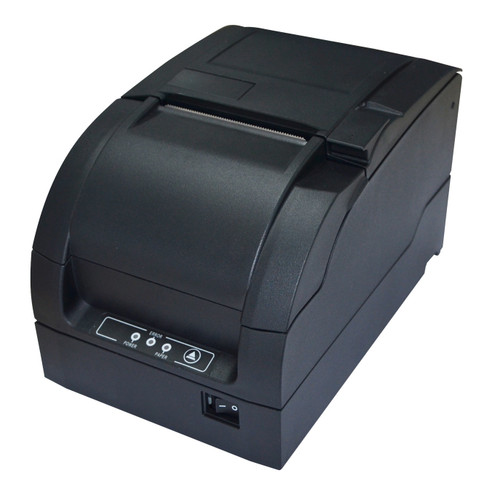
The Element RW337D is a dot matrix kitchen printer: a 9-pin impact receipt printer built for the one job a thermal printer cannot do. It strikes an inked ERC-38 ribbon onto ordinary plain bond paper instead of using heat, so the docket does not fade, grey off or blacken next to a grill, a fryer or a heat lamp, and it prints 2-ply and 3-ply carbon copies in the same pass.
It carries Ethernet, serial and USB on the one unit, prints at up to 4.7 lines per second in black and red, has a partial and full auto-cutter with automatic error recovery, and drives one or two cash drawers. Unlike the Epson TM-U220 series it competes with, the power supply is built in, so there is no external brick to find room for under the counter.
Where the Element RW337D is used
Anywhere a docket has to survive heat, steam or grease, or where one print needs to produce two copies:
- Restaurant and cafe kitchens, on the pass or at the grill, where thermal dockets are destroyed by heat within minutes.
- Bars and clubs, for drink dockets that stay legible in a wet, warm environment.
- Takeaway and delivery counters, printing an order copy for the kitchen and a copy for the bag.
- Dry cleaners and laundries, for 2-ply customer and garment tickets that sit next to steam presses all day.
- Workshops, warehouses and dispatch, where one copy travels with the goods and one stays on file.
- Any venue replacing an ageing TM-U220, since the ERC-38 ribbon and the bond rolls are unchanged.
2-ply and 3-ply dockets: the reason to buy an impact printer
This is what an impact printer does that a thermal printer physically cannot, so it is worth being clear about it. The RW337D runs standard 2-ply and 3-ply carbonless bond, which means one print produces two or three separate physical dockets in a single pass. The kitchen keeps one, the customer gets one, and with 3-ply a third goes to the bench, the driver or the file. No reprint, no second printer, no chance of the copies not matching.
3-ply support is a genuine point of difference. The Epson TM-U220 series that this printer competes with is rated for one original plus one copy, so if your workflow needs a third copy the RW337D covers it and the Epson does not. That matters for takeaway and delivery (kitchen, bag, driver), for dry cleaning and laundry (customer, garment, file), and for dispatch work where one copy travels with the goods, one is signed and one is kept.
Use plain carbonless multi-ply rolls at 0.05mm to 0.08mm per sheet in any of the four supported widths. Single-ply plain bond is fully supported as well, at 0.06mm to 0.085mm, if you only need the one copy. Whatever the ply, it has to be plain paper: an impact mechanism cannot mark thermal stock.
Impact vs thermal: which should you choose?
Thermal printers heat a chemical coating on the paper. They are quieter, faster and cheaper to run, and for a dry, room-temperature front counter printing short-lived receipts they are the sensible choice. The catch is that whatever heats the paper later also darkens it. Warmth, steam, oil, friction, sunlight and age all degrade a thermal docket, and it can never produce a carbon copy.
An impact printer has no coating to ruin. It hammers an ERC-38 ribbon onto plain bond, so the text is physically inked into the page and survives the environment it is printed into. That is why impact printing remains the default in kitchens, dry cleaners, workshops and dispatch benches, and why the format has outlived several generations of thermal hardware.
Key features of the Element RW337D
- 9-pin serial impact dot matrix mechanism, 80 x 144 dpi
- Ethernet, serial (RS-232) and USB interfaces on the one unit
- Print speed up to 4.7 lines per second
- Two-colour black and red printing with an ERC-38 ribbon
- 1-ply, 2-ply and 3-ply plain carbonless bond paper
- Four paper widths: 80mm, 76mm, 69.5mm and 57.5mm
- Built-in power supply, so no external brick
- Partial and full auto-cutter with automatic cutter-error recovery
- Drop-in paper loading with clamshell covers for fast roll changes
- Anti-jam design and a paper-saving function
- Cash drawer kick-out port, drives 1 or 2 drawers
- 64KB receive buffer and 17 codepages
- Uptime history recording and upload
Specifications
| Brand | Element |
| Model | RW337D |
| SKU | PRELRW337D001 |
| Print method | 9-pin serial impact dot matrix |
| Print speed | Up to 4.7 lines per second (400 dots per line) |
| Resolution | 80 x 144 dpi |
| Print width | 400 half dots / 200 full dots |
| Columns | Font A: 33 (76 mm), 30 (69.5 mm), 25 (57.5 mm). Font B: 40 / 36 / 30 |
| Paper widths | 80 mm, 76 mm, 69.5 mm and 57.5 mm (±0.5 mm) |
| Single-ply paper | 0.06 mm to 0.085 mm thickness |
| Multi-ply paper | Standard 2-ply and 3-ply carbonless bond, 0.05 mm to 0.08 mm per sheet |
| Colour | Two-colour black and red with a black/red ERC-38 ribbon |
| Ribbon | ERC-38 cartridge (the same ribbon as the Epson TM-U220 series) |
| Ribbon life | ERC-38 black 3,000,000 characters. Black/red 1,500,000 black and 750,000 red |
| Interfaces | Ethernet, serial (RS-232) and USB |
| Cash drawer | Kick-out port, drives 1 or 2 drawers |
| Auto-cutter | Partial and full cut, with automatic cutter-error recovery |
| Codepages | 17 supported |
| Receive buffer | 64 KB (128 KB NV image, 8 KB NV user memory) |
| Power supply | Built in. AC 100-240V, 1.0 A max, 50/60 Hz, so no external power brick |
| Print mechanism life | 10,000,000 lines |
| Print head life | 150,000,000 characters |
| Cutter life | 800,000 cuts at 0.08 mm paper, standard test conditions |
| Operating conditions | 5°C to 45°C, 20% to 90% RH |
| Dimensions | 160 (W) x 245 (D) x 154 (H) mm |
| Weight | 3.0 kg |
| Warranty | 12 Months Return to Base |
Figures above are taken from Element's RW337D brochure and Receipt Service Manual. Element's own marketing summary quotes higher headline numbers (300 million impacts, 1.5 million cuts, 18 million lines MCBF) than the technical specification table printed in the same brochure. We have published the engineering figures, which the service manual confirms.
How it compares to other impact kitchen printers
| Model | Interfaces | Speed | Power supply | Multi-ply | Price |
| Element RW337D (this printer) | Ethernet, serial, USB | 4.7 lps | Built in | Up to 3-ply | $399.00 |
| Epson TM-U220IIB | Ethernet | Up to 6.0 lps | PS-180 external brick | 2-ply | $525.00 |
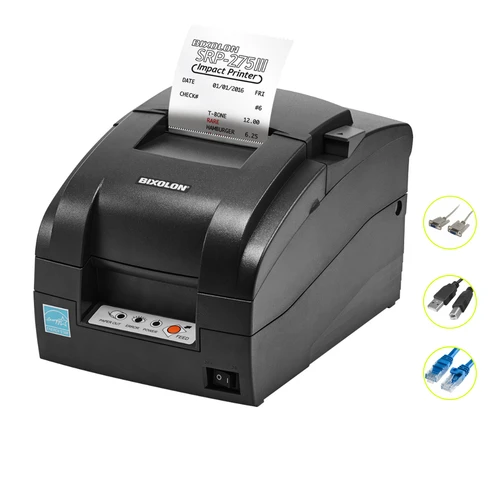
| Bixolon SRP-275III | USB, serial, Ethernet | Up to 5.1 lps | Built in | 2-ply | $469.00 |
All three run the same ERC-38 ribbon and plain bond rolls, so switching between them does not change your consumables. The RW337D is the only one of the three that takes 3-ply, and the only one offering four paper widths: the Epson takes three and the Bixolon is 76.5mm only. The Epson is the faster machine and the hospitality default, the Bixolon is the shallowest on the counter at 239mm deep.
What's in the box
- Element RW337D dot matrix kitchen printer (black)
- Power lead (the power supply is inside the printer)
- User guide and warranty card
The ERC-38 ribbon and paper rolls are ordered separately, so you can match them to the width and ply you actually run.
Paper and ribbons for the RW337D
The RW337D is a plain paper printer. Do not load thermal rolls: an impact mechanism cannot mark them properly and the docket comes out faint and unusable.
- Ribbon: ERC-38 cartridge. Choose black for plain dockets, or black and red to flag urgent items and allergens.
- Single-ply rolls: plain bond in 76mm or 57mm to suit your setup.
- 2-ply rolls: white and yellow bond, for a kitchen copy and a customer or file copy in one print.
- 3-ply rolls: a third copy in the same pass, for the driver, the bench or the file.
Stock up with the ERC30/34/38 black ribbon 6-pack and 76x76 bond rolls for single-ply work. For carbon copies, browse the full range of carbonised paper rolls, or go straight to the two 76mm sizes that suit this printer: 76x76 2-ply and 76x76 3-ply.
Using the RW337D as a kitchen printer
Put it on the Ethernet port and it becomes a network device with its own IP, which is how most modern POS platforms expect to address a kitchen printer. Orders sent from any till, tablet or cloud POS land on the pass, printed on bond that will still be readable at the end of service. Use the red half of a black and red ribbon for allergens and modifiers so they cannot be missed, and run 2-ply or 3-ply if the kitchen keeps a copy while others travel with the order.
It is loud, and that is deliberate. Kitchen staff hear the print over extraction fans and a full section, which is exactly what a silent thermal printer fails to do.
Application use cases
- Kitchen pass and grill station: heat-proof dockets that outlast the service.
- Bar and beverage station: drink dockets in a warm, wet environment.
- Dry cleaner and laundry: 2-ply customer and garment tickets.
- Dispatch and workshop: one copy with the goods, one on file.
- Front counter: a durable plain-paper receipt plus a cash drawer trigger.
Frequently asked questions
Can the Element RW337D print 2-ply and 3-ply carbon copy dockets?
Yes to both, and this is the main reason to choose an impact printer over a thermal one. The RW337D handles standard 2-ply and 3-ply carbonless bond, so a single print produces two or three physical dockets at once: one that stays on the rail or goes to the kitchen, one for the customer, and a third for the bench or the file. A thermal printer cannot do this at all, because it only marks the sheet it heats. Use plain carbonless multi-ply rolls at 0.05mm to 0.08mm per sheet in any of the four supported widths.
Does the RW337D support 3-ply paper?
Yes. The Element RW337D is confirmed to run standard 3-ply carbonless bond, so one print gives you three copies with no reprint and no second printer. This is a genuine advantage over the Epson TM-U220 series, which Epson rates for one original plus one copy only, so if your workflow needs a third copy the RW337D does it and the TM-U220 does not. Use standard 3-ply carbonless rolls such as our 76x76 3-ply bond, which you will find with the rest of the range under carbonised paper rolls, and stay with plain paper: an impact printer cannot mark thermal stock. If you are unsure which roll suits your workflow, call us on 1300 115 808.
Is the Element RW337D a kitchen printer?
Yes, that is its primary job. It is an impact printer, so it strikes an inked ERC-38 ribbon onto plain bond paper instead of using heat on thermal paper. That matters next to a grill, fryer, pass or heat lamp, where a thermal docket goes grey or black within minutes. The impact mechanism is also audible over a busy kitchen, which a silent thermal printer is not, and the Ethernet port lets it sit on the venue network so any POS terminal can send to it by IP.
Why use an impact printer instead of a thermal printer in a kitchen?
Thermal printing works by heating a chemical coating on the paper, and anything that heats the paper afterwards darkens it too: steam, oil, a heat lamp, sunlight or simple age. In a kitchen a thermal docket can be unreadable before the order is plated. An impact printer has no heat-sensitive coating to ruin. The characters are physically inked into ordinary bond paper, so the docket survives the whole service, and it can produce a carbon copy, which thermal cannot.
Does the Element RW337D need an external power brick?
No. The power supply is built into the printer, so it runs from a standard mains lead with nothing extra under the counter. Element specifies it at AC 100-240V, 1.0A maximum, 50/60Hz. This is a real difference from the Epson TM-U220 series, which uses an external PS-180 brick that has to sit somewhere and often goes missing when a printer is moved between sites.
What ribbon does the RW337D use?
An ERC-38 ribbon cartridge, which is the same ribbon the Epson TM-U220 series uses, so it is easy to source and inexpensive to keep on the shelf. A black ERC-38 is rated at roughly 3,000,000 characters. A black and red ERC-38 gives about 1,500,000 characters in black and 750,000 in red, and lets you print urgent items, allergens and special instructions in red so they stand out on a busy pass.
What paper does it take?
Plain bond paper, not thermal, in 80mm, 76mm, 69.5mm or 57.5mm widths. The common size for kitchen work is 76mm. Single-ply stock runs 0.06mm to 0.085mm thick, and 2-ply and 3-ply carbonless rolls run 0.05mm to 0.08mm per sheet. Do not load thermal rolls: an impact printer cannot mark them properly and you will get a faint, unusable docket.
Which interfaces does it have, and can I use them all?
This model ships with Ethernet, serial (RS-232) and USB on board. You use one at a time and pick whichever suits the site: Ethernet for a networked kitchen printer that any till or cloud POS can address by IP, USB for a printer sitting beside the terminal, or serial for older and purpose-built POS systems. Having all three on one unit means a single part number covers most installations.
Will the RW337D work with my POS software?
It is a standard ESC/POS-compatible impact printer with 17 codepages and the three common interfaces, so it drops into most systems that already support a TM-U220 style kitchen printer. POS platforms do differ, so check this model against your provider's supported-hardware list, or call our team on 1300 115 808 and we will confirm it against your setup before you buy.
Can it open a cash drawer?
Yes. It has a drawer kick-out port and can drive one or two cash drawers, so it can act as the front-counter receipt printer as well as a kitchen printer if that suits your layout.
How reliable is it, and what is the warranty?
Element rates the print mechanism at 10,000,000 lines, the print head at 150,000,000 characters and the auto-cutter at 800,000 cuts under standard test conditions. It also has an anti-jam design and clears cutter errors automatically, which matters mid-service. It is supplied with a 12 Months Return to Base warranty.
How does the RW337D compare with the Epson TM-U220IIB?
Both are 9-pin impact kitchen printers running the same ERC-38 ribbon on plain bond paper. The Epson is faster at up to 6.0 lines per second against 4.7, and it is the long-standing default that most Australian POS systems are already configured for. The Element is cheaper, takes 3-ply where the Epson is rated for one original plus one copy, has its power supply built in rather than using an external PS-180 brick, and gives you Ethernet, serial and USB on one unit where the Epson models are sold as separate interface variants.
The Element RW337D is a tri-interface impact dot matrix kitchen printer for Australian hospitality and retail. It prints black and red on plain bond at up to 4.7 lines per second, takes 1-ply, 2-ply or 3-ply stock, has a built-in power supply and an auto-cutter, and runs the widely available ERC-38 ribbon. Backed by a 12 Months Return to Base warranty and shipped Australia-wide by POS PLAZA. Browse more Kitchen Printers and Impact / Dot Matrix Receipt Printers.
Print Resolution:
80 x 144 dpi
Interface:
Ethernet
Interface:
Serial
Interface:
USB
Max Roll Diameter:
80 mm
Size:
4 inch
Brand:
Element
Model:
RW337D
Product Type:
Dot Matrix Kitchen Printer
Color:
Black
Print Method:
Impact (Dot Matrix)
Print Speed:
Up to 4.7 lines per second
Print Width:
400 half dots / 200 full dots
Paper Type:
Plain bond (not thermal)
Paper Widths:
80 mm, 76 mm, 69.5 mm, 57.5 mm
Columns:
Font A 33 / Font B 40 at 76 mm
Colour Support:
Black
Colour Support:
Red
Ribbon:
ERC-38 cartridge
Auto-Cutter:
Partial and full cut, automatic error recovery
Cash Drawer:
Kick-out port, drives 1 or 2 drawers
Power Supply:
Built in, AC 100-240V 50/60 Hz (no external brick)
Codepages:
17
Receive Buffer:
64 KB
Print Head Life:
150,000,000 characters
Print Mechanism Life:
10,000,000 lines
Cutter Life:
800,000 cuts
Dimensions:
160 (W) x 245 (D) x 154 (H) mm
Weight:
3.0 kg
Operating Temperature:
5C to 45C
Warranty:
12 Months Return to Base
Multi-Ply Support:
Standard 2-ply and 3-ply carbonless bond


 My Account