 My Account
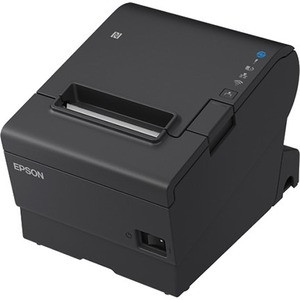


Epson TM-T88VII Direct Thermal Receipt Printer - Ethernet, USB & Serial, Auto-Cutter
Epson
-
SKU:
C31CJ57612

FOUND A CHEAPER PRICE? *
$759.00
Excl.GST:
$568.18
Incl.GST:
$625.00
- 8715946697093
- Warranty:
- 48 Months Return to Base

The Epson TM-T88VII is the seventh generation of the TM-T88 series, Epson's most widely deployed thermal receipt printer. It prints at up to 500mm per second on 80mm thermal paper at 180 dpi, and ships with Ethernet, USB and Serial all built in, plus an auto-cutter and a 4 year warranty.
Part number C31CJ57612. It speaks both ESC/POS and ePOS, works with PC, Mac, iOS, Android and SPARC, and supports Server Direct Print so it can pull print jobs straight from a web server without a PC in the middle. The enclosure is water resistant, which matters on a counter where drinks get spilled.
Epson TM-T88VII key features
- Print speed up to 500mm/s, among the fastest in its class
- Ethernet, USB and Serial interfaces built in, no add-on module needed
- 180 dpi print resolution on 80mm thermal paper
- Auto-cutter for clean receipt separation
- ESC/POS and ePOS emulation for broad POS compatibility
- Server Direct Print, so the printer can fetch jobs from a server directly
- WPA3 support for current wireless security standards
- Water resistant enclosure
- Works with PC, Mac, iOS, Android and SPARC
- 48 Months Return to Base warranty
Specifications
| Brand | Epson |
| Model | TM-T88VII |
| Part number | C31CJ57612 |
| Print method | Direct thermal |
| Print speed | Up to 500mm/s |
| Resolution | 180 dpi |
| Paper width | 80mm thermal |
| Print colour | Monochrome |
| Interfaces | Ethernet, USB, Serial |
| Emulation | ESC/POS and ePOS |
| Cutter | Auto-cutter |
| Compatibility | PC, Mac, iOS, Android, SPARC |
| Wireless security | WPA3 supported |
| Other features | Server Direct Print, water resistant enclosure |
| Warranty | 48 Months Return to Base |
How it compares to other Epson receipt printers
All three are Epson direct thermal receipt printers on 80mm paper with an auto-cutter. The difference is speed, connectivity and how much printer the site actually needs.
| Printer | Speed | Best for |
| Epson TM-T88VII (this printer) | 500mm/s | High-volume counters that want the flagship: fastest print, all three interfaces, Server Direct Print and a 4 year warranty |
| Epson TM-m30III | 250mm/s | Compact tablet and cloud POS setups that need Bluetooth and Wi-Fi rather than Serial |
| Epson TM-T82IIIL | Entry level | Budget-conscious counters that need reliable Epson thermal printing without the flagship feature set |
Upgrading from a TM-T88VI? The TM-T88VII is the direct successor. It keeps the same 80mm paper, the same ESC/POS command set and a familiar footprint, so your paper stock and most POS integrations carry across, while raising print speed and adding Server Direct Print and WPA3. If you are standardising a fleet, the VII is the model to specify now, since the VI is end of line. For a full side-by-side breakdown, read our Epson TM-T88VII vs TM-T88VI comparison.
Paper for the TM-T88VII
This is a direct thermal printer, so it takes 80mm thermal rolls and no ribbon or ink:
- 80x80 thermal rolls, box of 24 for a single counter
- 80x80 thermal rolls, box of 48 for multi-till sites or bulk buying
Frequently asked questions
Where do I get the Epson TM-T88VII driver?
From Epson's own support site. You want the Advanced Printer Driver (APD) for standard Windows printing, or the OPOS or JavaPOS driver if your POS software specifies one. Install the driver first and connect the printer afterwards. If you are unsure which driver your POS needs, call us on 1300 115 808 and we will tell you which one to install.
Do I have to install the driver before connecting the printer?
Yes, and this is the single most common cause of a TM-T88VII that will not print. Run the driver installer first, then connect the USB cable. If you have already plugged it in, uninstall, reinstall the driver, and reconnect afterwards.
Can I reuse the driver from my old TM-T88V or TM-T88VI?
No. The driver and configuration utility are model specific, so install the TM-T88VII versions even if the older printer is being swapped out on the same counter. Paper and most POS integrations do carry across, but the software does not.
What is the default password for the TM-T88VII web configuration?
There is no single universal default on current firmware, since Epson moved away from shared default credentials. Print the status sheet by holding the feed button while powering the printer on, check the documentation supplied with your unit, or call us on 1300 115 808 and we will help you get in.
My TM-T88VII will not print. What should I check first?
In order: was the driver installed before the printer was connected (reinstall in that order if not); does the self-test sheet print when you hold the feed button while powering on (if yes, the printer is fine and it is a driver or network problem); on Ethernet, is the printer still on the IP address your POS expects; and is the paper roll the right way round, since thermal paper only prints on one side.
How do I find the printer's IP address?
Hold the feed button while switching the printer on. It prints a status sheet listing the current network settings including the IP address. You can also set and change the address using Epson's TM-T88VII utility, and we recommend assigning a static IP or a DHCP reservation so it does not change.
What is the difference between the TM-T88VI and the TM-T88VII?
The TM-T88VII is the current generation and the direct replacement for the TM-T88VI. It is faster at up to 500mm/s, adds Server Direct Print and WPA3 wireless security, and carries a 4 year warranty. Paper, the ESC/POS command set and the general footprint carry over, so 80mm rolls and most POS integrations move across without change. Drivers and the configuration utility are model specific, so install the VII versions rather than reusing the VI ones. Our Epson TM-T88VII vs TM-T88VI comparison goes through every change in detail.
Is this the same as the OmniLink TM-T88VII?
OmniLink is Epson's name for its intelligent printing capability, where the printer can pull print jobs directly from a web server instead of relying on a connected PC. This TM-T88VII supports Server Direct Print, which is that capability. If your POS provider has specified a particular OmniLink configuration, send us the part number and we will confirm whether this unit matches before you order.
What paper does the TM-T88VII use?
Standard 80mm thermal receipt rolls, most commonly 80x80mm. There is no ribbon or ink: direct thermal printing works by heating the coated side of the paper, so the only consumable is the roll itself.
Will the TM-T88VII work with my POS software?
Very likely. The TM-T88 series is the most widely supported receipt printer family in POS, and this model covers ESC/POS and ePOS across Ethernet, USB and Serial. That said, some cloud POS platforms certify a specific list of models and firmware. Check the TM-T88VII against your provider's supported-hardware list, or call us on 1300 115 808 and we will confirm it before you order.
Can the TM-T88VII connect over Wi-Fi?
This configuration ships with Ethernet, USB and Serial. Epson offers wireless connectivity for the TM-T88 series through an optional adaptor, and the printer supports WPA3 security. If you need wireless out of the box, the Epson TM-m30III has Wi-Fi and Bluetooth built in. Talk to us about which suits your site.
What warranty does it carry?
48 Months Return to Base, which is four years and longer than most receipt printers in this class. That is a meaningful part of the total cost of ownership on a printer that runs all day.
The Epson TM-T88VII (part number C31CJ57612) is a direct thermal POS receipt printer that prints up to 500mm per second at 180 dpi on 80mm thermal paper, with Ethernet, USB and Serial interfaces, an auto-cutter, ESC/POS and ePOS emulation, Server Direct Print, WPA3 support and a water resistant enclosure. It works with PC, Mac, iOS, Android and SPARC systems and is covered by a 48 Months Return to Base warranty. It is the seventh-generation model in Epson's TM-T88 series and the direct successor to the TM-T88VI.
Also searched as: Epson TM-T88VII, TM-T88VII, epson tm t88vii, TM-T88VII driver, Epson TM-T88VII driver, TM-T88VII utility, Epson TM-T88VII setup, Epson OmniLink TM-T88VII, C31CJ57612, Epson TMT88VII, TM-T88VII Ethernet, Epson TM-T88VII price Australia, TM-T88VI vs TM-T88VII.
Need help choosing or setting one up? Call POS PLAZA on 1300 115 808 or browse all Epson Receipt Printers and Thermal Receipt Printers.
Manufacturer:
Epson
Brand:
Epson
Model:
TM-T88VII
SKU:
C31CJ57612
Print Color:
Monochrome
Print Speed:
500 mm/s
Resolution:
180 dpi
Max Label Width:
80 mm
Interface:
Ethernet
Interface:
USB
Interface:
Serial
Emulation:
ESC/POS
Emulation:
ePOS
Compatibility:
PC
Compatibility:
Android
Compatibility:
iOS
Compatibility:
Mac
Compatibility:
SPARC
Warranty:
4-Year
Features:
With Cutter
Features:
Water-resistant enclosure
Features:
WPA3 support
Features:
Server Direct Print
Print Method:
Direct Thermal
Related Products